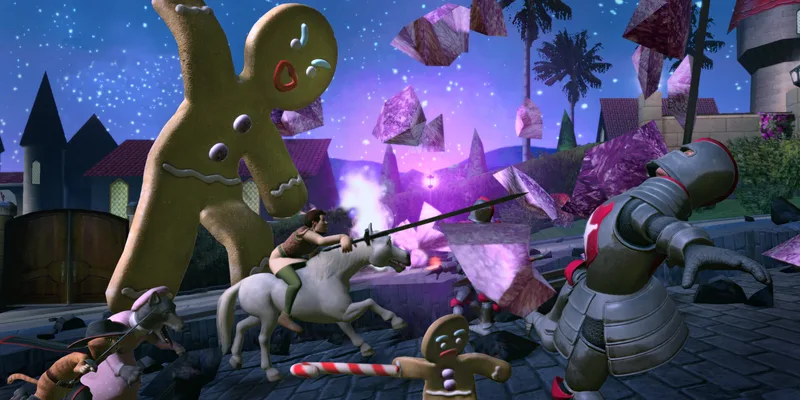
- DreamWorks Shrek 2 Remastered pc setup requires Windows 11 64-bit, 8GB RAM, and a compatible DirectX 12 graphics card.
- Launch date: The remastered adventure is scheduled for November 10, 2026, across PC and modern consoles.
- Best starting approach: Learn character switching, inspect side paths, and use the right hero for each obstacle.
- Co-op support: The game supports up to four players through local, online, and mixed multiplayer options.
- Performance priority: Lower shadows and effects first when frame rate becomes inconsistent.
PC Setup and Platform Overview
DreamWorks Shrek 2 Remastered pc is a cooperative action-adventure release designed for modern hardware. The PC version is planned for Steam and the Epic Games Store on November 10, 2026, alongside PlayStation 5, Xbox Series X|S, Nintendo Switch 2, and Nintendo Switch editions.
The remaster focuses on improved materials, updated presentation, enhanced cutscenes, and support for up to four players. PC players can use keyboard and mouse controls or connect a compatible gamepad for a console-style layout.
For official updates, check the DreamWorks Shrek 2 Remastered website, the Steam store page, and Aspyr support.
| Platform | Release date | Main features | Multiplayer |
|---|---|---|---|
| PC | November 10, 2026 | Steam, Epic Games Store, graphics options, controller support | Up to four players |
| PlayStation 5 | November 10, 2026 | Current-generation presentation and controller support | Local and online options |
| Xbox Series X|S | November 10, 2026 | Current-generation console support | Local and online options |
| Nintendo Switch 2 | November 10, 2026 | Modern Nintendo hardware support | Platform features may vary |
| Nintendo Switch | November 10, 2026 | Handheld and docked play | Platform features may vary |
Confirm that your graphics driver, operating system, and controller firmware are current before launching. This reduces avoidable startup and input problems.
DreamWorks Shrek 2 Remastered PC Requirements
The published minimum PC specifications provide a practical baseline for launching the remaster. A system that meets the minimum requirements should be treated as an entry point rather than a guarantee of high-resolution performance.
The official minimum configuration lists Windows 11 64-bit, 8GB of memory, an NVIDIA GTX 1060 or AMD RX 570, DirectX 12, and 15GB of available storage. Keep additional free space available for patches and temporary installation files.
| Component | Minimum requirement | Setup advice |
|---|---|---|
| Operating system | Windows 11 64-bit | Install current system updates before launch |
| Memory | 8GB RAM | Close heavy background applications during play |
| Graphics card | NVIDIA GTX 1060 or AMD RX 570 | Update the graphics driver before testing performance |
| Graphics API | DirectX 12 | Confirm Windows and driver compatibility |
| Storage | 15GB available space | Leave extra room for updates and shader files |
| Input | Keyboard and mouse or compatible gamepad | Connect the controller before starting the game |
Use the following order when tuning performance:
Check the Hardware Baseline
Compare your processor, graphics card, memory, and free storage with the published minimum requirements. If your PC only slightly exceeds the baseline, begin with conservative graphics settings.
Update Windows and Drivers
Install available Windows updates and the latest stable graphics driver for your NVIDIA or AMD card. Restart the computer after major driver changes.
Start With Stable Graphics Settings
Select your monitor’s native resolution if performance allows. Otherwise, reduce resolution before making several other changes at once.
Tune the Most Expensive Options
Lower shadows, effects, and post-processing first when frame rate drops. Reduce texture quality only if graphics memory or loading performance remains a concern.
| Setting | Start here | Adjust when |
|---|---|---|
| Resolution | Native display resolution | Reduce it if frame rate remains low |
| Textures | Medium or high, depending on VRAM | Lower if stuttering continues |
| Shadows | Medium | Lower first during busy combat scenes |
| Effects | Medium | Reduce during particle-heavy encounters |
| Frame-rate limit | Match your display when stable | Use a cap to smooth uneven frame pacing |
| V-sync | Enable if tearing appears | Disable only when testing latency or frame pacing |
Do not judge performance from a single quiet area. Test the PC during combat, exploration, and cooperative scenes because busy encounters can place different demands on the system.
Characters, Combat, and Exploration Tips
Shrek 2 Remastered is built around a team of characters with different strengths. Switching heroes is not only a combat choice; it is also a key exploration tool for environmental obstacles, alternate routes, and cooperative puzzles.
| Character | Primary role | Best use | Switching cue |
|---|---|---|---|
| Shrek | Power fighter | Heavy enemies, close combat, strength-based obstacles | Use when an object must be broken or moved |
| Fiona | Balanced fighter | Fast melee encounters and flexible movement | Choose her when mobility matters |
| Donkey | Ranged support | Distant enemies and crowd control | Switch when approaching enemies is risky |
| Puss in Boots | Agile attacker | Precision attacks, fast enemies, hit-and-run combat | Use when speed is more valuable than power |
Shrek
Strength specialist
Use heavy attacks against grouped enemies and inspect the environment for objects that require extra force.
Fiona
Balanced fighter
Fiona is a dependable choice when a section combines movement, quick attacks, and mixed enemy types.
Donkey
Ranged support
Keep distance from dangerous groups and use ranged pressure before committing to close combat.
Puss in Boots
Precision attacker
Use speed, quick strikes, and evasive movement against exposed or mobile targets.
A reliable combat loop is simple:
- Separate large enemy groups when possible.
- Use Donkey to pressure distant or difficult targets.
- Switch to Shrek when enemies cluster or heavy obstacles appear.
- Choose Fiona or Puss in Boots when repositioning becomes more important than raw damage.
- Search the arena after combat before continuing toward the next objective.
Switch characters whenever an obstacle or enemy group does not suit your current fighter. The game rewards team variety more than repeating one attack pattern.
Beginner Route and Four-Player Co-op
The opening hours are easiest when players treat exploration and combat as connected systems. Learn the controls in safer areas, inspect side routes, and avoid rushing past interactive objects. In multiplayer, communicate before activating switches or splitting the party.
The main route moves through areas such as Shrek’s Swamp, Far Far Away, Fairy Godmother’s Potion Factory, and Far Far Away Castle. Each location encourages character switching and environmental awareness.
| Area | Main focus | Recommended habit |
|---|---|---|
| Shrek’s Swamp | Core movement and combat | Practice switching and inspect early side paths |
| Far Far Away | Larger combat spaces | Combine ranged pressure with heavy attacks |
| Potion Factory | Machinery and hazards | Check switches, platforms, and movable objects |
| Far Far Away Castle | Tougher encounters and finale | Save useful resources for later battles |
Essential Progress Checklist:
- Verify Windows 11 64-bit and DirectX 12 compatibility
- Connect and test the preferred controller or keyboard layout
- Learn movement, attacks, interaction, and character switching
- Inspect side paths before triggering major area transitions
- Assign character roles before starting a four-player session
For co-op, prepare every controller before loading the level. Local play is suited to shared-screen sessions, while online play allows remote participants to join through the supported multiplayer flow. Mixed multiplayer can combine local and online players where supported by the platform configuration.
Assign one player to lead movement, one to watch for interactive objects, and the remaining players to manage combat. Reunite before story triggers or major transitions.
PC Troubleshooting and FAQ
Most PC issues can be narrowed down by changing one variable at a time. Start with drivers and input detection, then check graphics settings, storage, and background applications. When diagnosing a problem, record what changed before restarting the game.
| Symptom | First check | Recommended action |
|---|---|---|
| Game does not launch | Windows, drivers, and DirectX | Update the system and graphics driver, then restart |
| Controller is not detected | Connection and input assignment | Reconnect it before launch and check button mapping |
| Frame rate drops | Shadows, effects, and resolution | Lower shadows first, then effects or resolution |
| Stuttering occurs | Background programs and storage | Close overlays and keep free space on the installation drive |
| Online player cannot join | Lobby and network stability | Recreate the lobby and verify each player’s connection |
For additional technical help, use the official Aspyr support center. Avoid relying on unverified legacy cheat lists or unsupported configuration files. The remaster includes a built-in Cheats Menu, but individual code details should be confirmed in the released game or official documentation.
Q: What are the DreamWorks Shrek 2 Remastered pc minimum requirements?
The published minimum configuration lists Windows 11 64-bit, 8GB RAM, an NVIDIA GTX 1060 or AMD RX 570, DirectX 12, and 15GB of storage.
Q: When does DreamWorks Shrek 2 Remastered release on PC?
The planned PC release date is November 10, 2026, with availability listed for Steam and the Epic Games Store.
Q: Can I play Shrek 2 Remastered with four players?
Yes. The game is planned to support up to four players through local, online, and mixed cooperative options, subject to platform configuration.
Q: Which character should beginners use first?
Shrek is a straightforward starting choice because his heavy attacks are useful in close combat and his strength helps with environmental obstacles. Switch characters whenever the situation requires a different ability.
Create a normal save before experimenting with the built-in Cheats Menu. Keeping progression and experimentation separate makes it easier to return to a completion-focused playthrough.